 Zendesk
Making Usage Visible
TL;DR
I designed a unified usage dashboard inside Zendesk's Admin Center, consolidating data that had been split across two tools. Scoped the MVP with engineering and shipped to 10,000+ customers.
Background
Growing pains
When Zendesk acquired startup Smooch.io in 2019, the platform was rebranded as Sunshine Conversations and became the backbone of Zendesk's messaging infrastructure. As part of the Conversations team, I was brought in to help unify the experience, starting with how customers tracked their usage.

Customer service software

Omni-channel messaging

Powers all messaging services across Zendesk
All conversations captured in one place
Problem
Admins juggled two interfaces for one product
In order to view their complete analytics, customers were required to alternate between two dashboards, creating a fragmented experience.
I was tasked with building a page inside the Admin Center where admins could track their Monthly Active Users (MAUs) and Notifications in one place.
Design constraints
- New dashboard to match Zendesk's Admin Center design system
- No existing data visualization design system to lean on
Process
Building around what admins need to know
Distilling the PRD
I boiled the requirements down to what admins were really asking, and what the page had to show for each.
Questions admins needed answered
“Where can I see my usage?”
A new Usage section in the side nav.
“What’s an MAU?”
“What’s a Notification?”
“How many do I have?”
Usage count and a link to learn more.
6 months of history to spot trends.
Sketching structure
My early sketch split MAUs and Notifications into tabs, with a dropdown to switch billing periods. I wasn't sure yet how the data should be organized, so I kept it rough and brought it to stakeholders before investing in high fidelity.
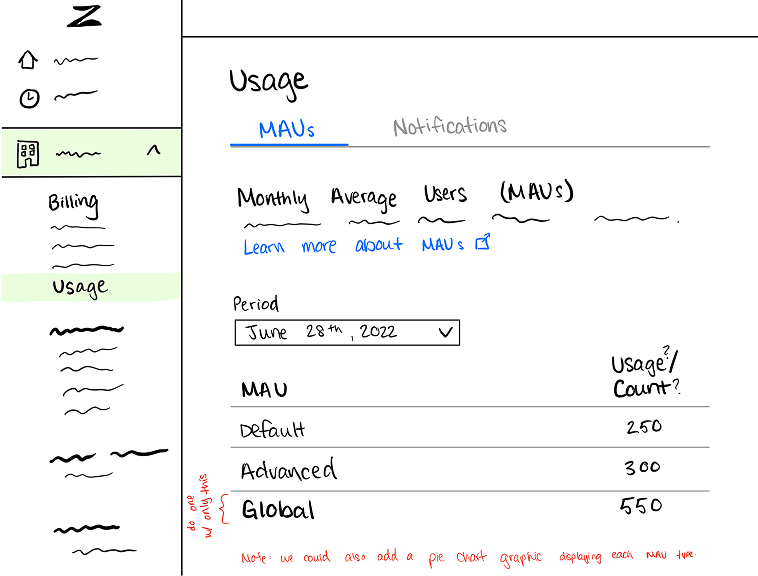
prototyping, pre-vibe coding era
Iterating the hi-fi
When I presented the first round, stakeholders gave constructive feedback. I took the critique back to Figma, alongside the Admin Center design constraints, and reworked three things:
One page, no switching
Tabs didn't earn their keep when everything could fit on one page. I collapsed them into a single scroll.
Supporting scannability
Metrics weren't scannable enough to be useful. I pulled the current-period numbers into three widgets up top.
Built from what existed
I used components the Admin Center already had, so the page felt native and stayed light for engineering to build.
Scoping to what could ship
Given its high priority, my PM flagged that data visuals weren't feasible for the initial release, and engineering backed this up, as there was no existing graph infrastructure to build on. This forced me to figure out what the page truly needed.
Final Product
The MVP that shipped
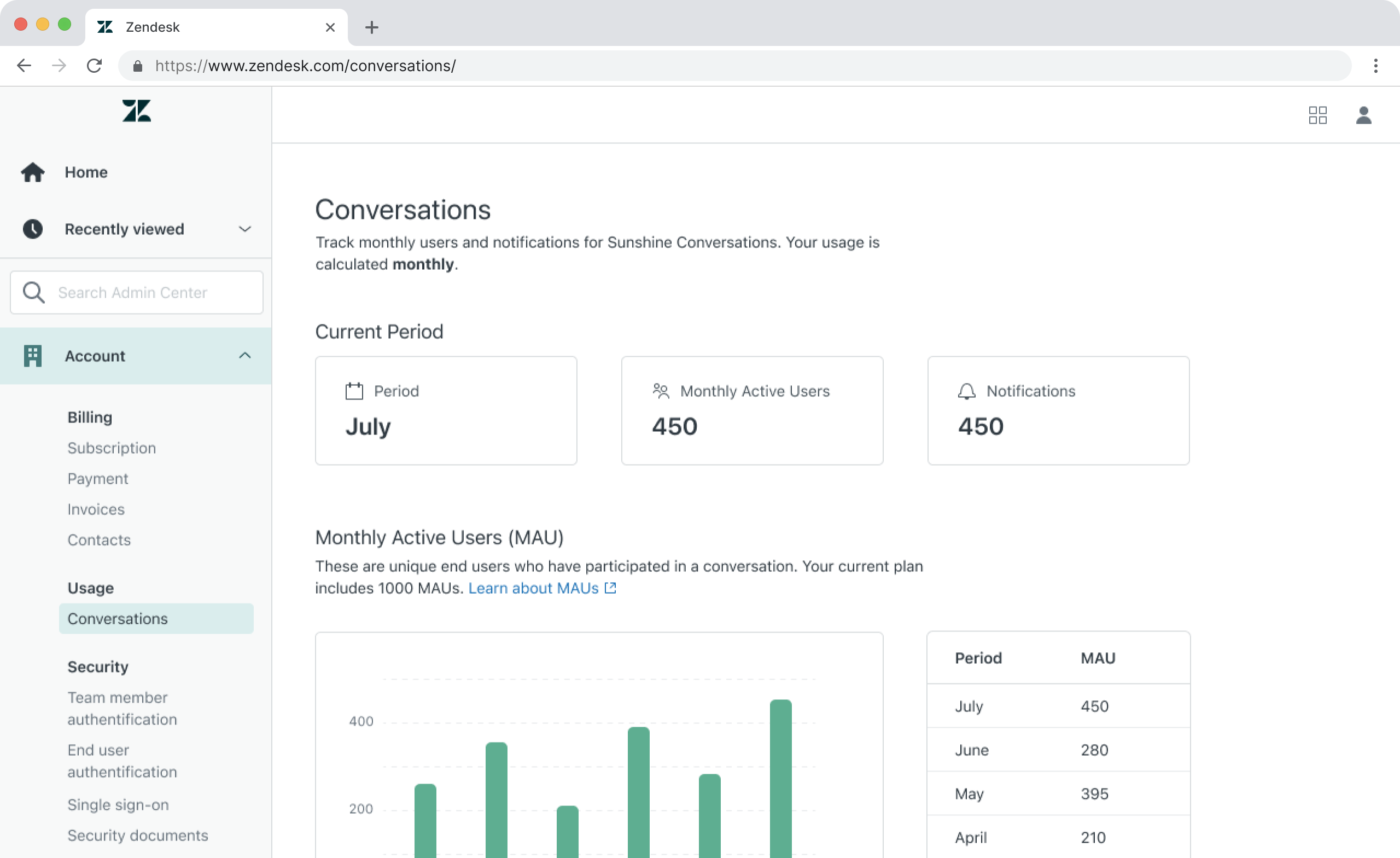
Distinct widgets for the current period, table underneath for six months of MAU and notification history, all on one page. Inline links explain what MAUs and Notifications are and what counts toward each.

the shipped version, table-first.
Exploration
Visualizing the full picture
Once the MVP was scoped and approved, I was tasked with exploring what a version with charts could look like as a future enhancement. I also designed for the full range of states a customer might encounter.
Normal usage
Default6-month bar graph and data table.

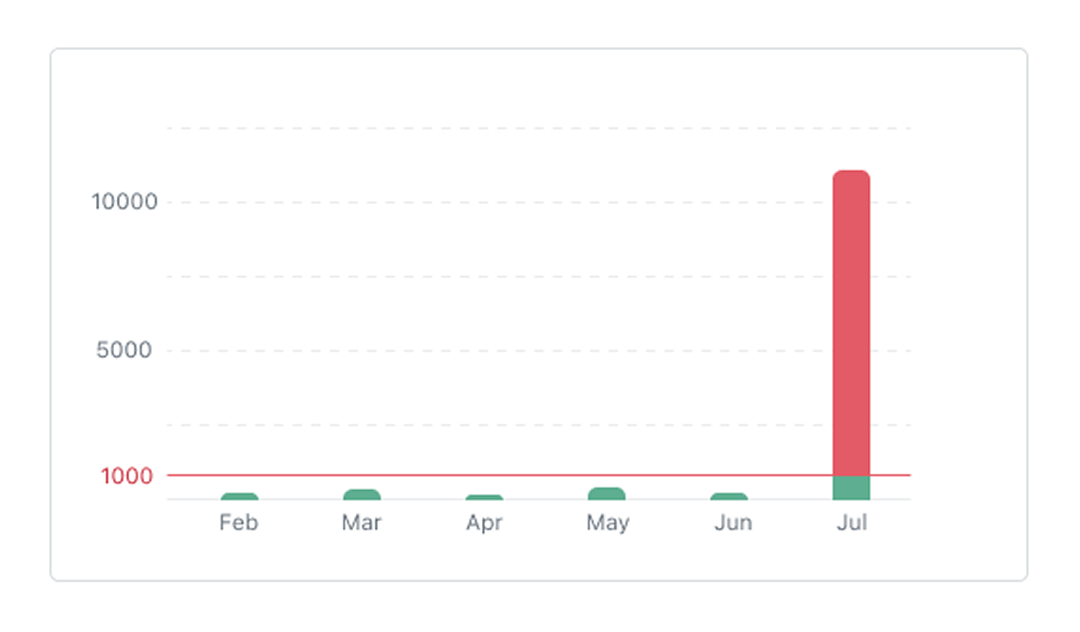
Plan limit reached
OverageA message box prompts users to contact support to adjust their plan. Affected metrics are called out in orange.

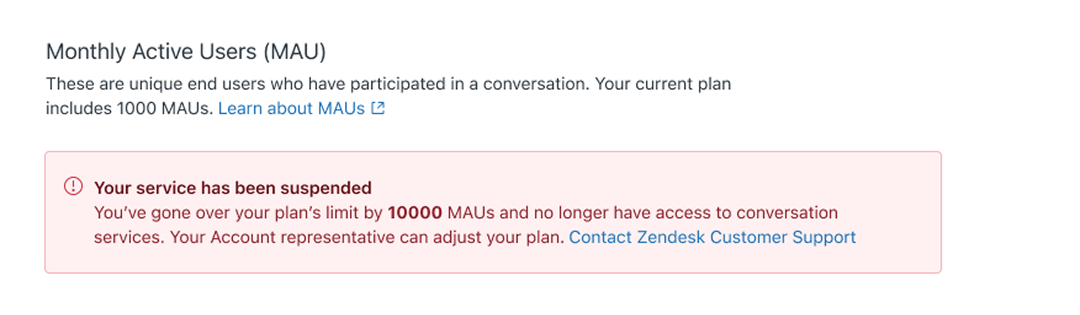
Conversations paused
SuspendedWhen usage is severely over the limit, conversation services are paused and a prominent error banner drives users to contact support.

Impact
Shipping the small (but mighty) version
I designed the full dashboard vision, then cut it with engineering to what could ship. The table view launched, unblocking customers who had been jumping between two tools. I mapped API and integration schemas to accelerate the handoff, finishing ahead of schedule.
10,000+
Users reached at rollout
15%
Faster feature completion
Reflections
Beyond the design file
Leading a real project taught me that product design lives as much in the conversations and tradeoffs as it does in Figma.
Constraints clarify
Designing within real constraints forced me to get clear on what the page actually needed versus what would be nice to have, and how to make the case for the best experience within those boundaries.
Embracing the loop
Each round of feedback was a chance to ask the right questions, navigate ambiguity, and ultimately pull the design somewhere better.
thanks for reading (✿・‿・)ノ゛
Up next
 FigBuild 2026
 Reddit